1
Start from the Main Keypad Screen
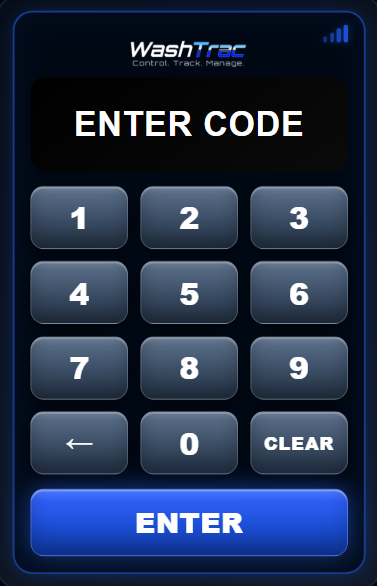
The Keypad normally shows the standard access-code screen.
- The display should show ENTER CODE
- Users can enter a valid 4-digit wash code
- Programming is only for authorized setup or management changes
2
Enter Programming Mode
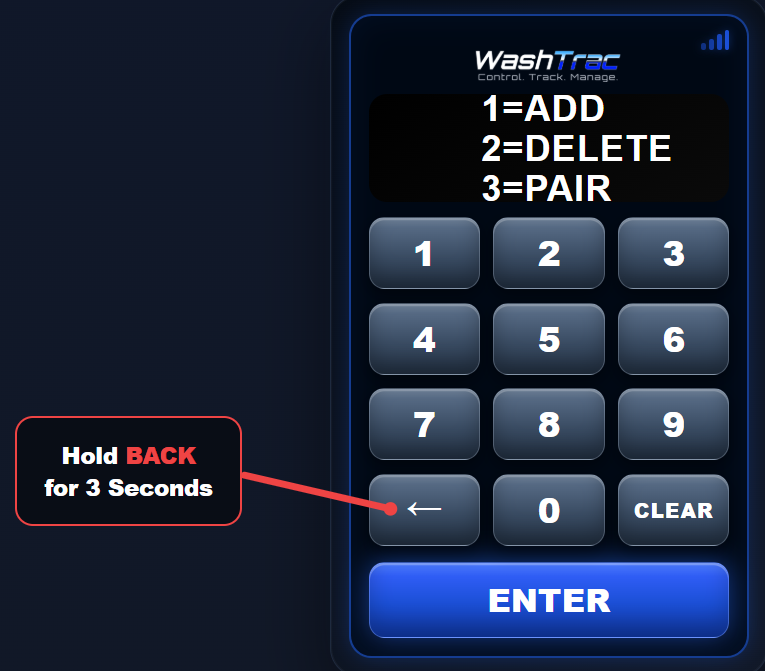
Hold the BACK button for several seconds to open the programming area.
- Press and hold the BACK arrow
- Wait for the programming screen to appear
- Enter the required master/programming code if prompted
Programming access should only be given to trusted users who are allowed to manage codes or pair devices. *Master Code = 0000
3
Choose a Programming Option
Once programming mode opens, select the action you want to perform.
- 1 = ADD adds a new keypad access code
- 2 = DELETE removes an existing keypad access code
- 3 = PAIR links the device to a WashTrac account
4
Add an Access Code
Use the ADD option to save a new 4-digit wash access code.
- Select 1 = ADD
- Enter the new 4-digit code
- Press ENTER if prompted
- Wait for the confirmation message
5
Delete an Access Code
Use the DELETE option to remove a 4-digit access code that should no longer activate the wash.
- Select 2 = DELETE
- Enter the 4-digit code to remove
- Confirm the deletion when prompted
- Wait for the confirmation message
6
Exit Programming Mode
When finished, return the keypad to the normal access-code screen.
- Use BACK or CLEAR if available
- Wait for the keypad to time out automatically
- Confirm the display returns to ENTER CODE
Programming Complete
The keypad is ready for normal use. Test any newly added code before leaving the site.
Return to FAQ & Guides
 Back to Guides